If your agent can write the code, it should be able to ship it too. So this week, we laid three new tracks for it.
The Railway Remote MCP Server is now live at mcp.railway.com, ready for any MCP-compatible editor to plug into over OAuth. The CLI picks up a new railway agent command for driving Railway from a terminal, a script, or CI. And railway skills drops Railway's agent skills into Claude Code, Cursor, Codex, and OpenCode, so your coding agent shows up knowing how Railway works.
We wrote a longer piece on why we're leaning into agents and where we're headed. Read the full blog post.
Let's get into it! 🚄
Railway Remote MCP server
Connect the Railway remote MCP server to Claude CodeThe Railway remote MCP server is live at mcp.railway.com and ready for public testing. Any MCP-compatible agent (Claude, Cursor, Codex, GitHub Copilot, Droid, OpenCode, and others) can connect over OAuth and start driving Railway from the editor.
Head to mcp.railway.com for click-to-copy snippets. Add one to your editor's MCP config, hit connect, and OAuth opens in your browser. You pick which workspaces and projects the client can access, and you can revoke it from Railway settings at any time.
For Claude Code, the fastest path is:
claude mcp add railway --transport http https://mcp.railway.comOnce connected, your client can:
- List projects, services, and environments
- Create new projects
- Redeploy a service, or commit staged changes with
accept-deploy(marked destructive, so the client prompts before running it). - Hand multi-step work off to
railway-agent, which delegates to the same Railway agent that powers the dashboard. It's the natural-language escape hatch for things like "figure out why my backend service is crashing on deploy."
The tool surface starts intentionally small (7 tools today) and leans on railway-agent for multi-step operations. A question like "debug my deploy" is one round-trip from your editor's perspective, with the full multi-step reasoning happening on our side, so the client's context stays cheap.
We wrote a longer piece on the thinking behind the Remote MCP Server, including our tool-surface strategy and why railway-agent is the escape hatch for multi-step work. Read the full blog post.
You can also read the Remote MCP Server docs, or share feedback in the Central Station thread.
Railway Agent in the CLI
Railway Agent in the CLINot every workflow lives in an editor. Some live in a terminal, a script, or a CI job. railway agent is another surface on the Railway Agent you already use in the dashboard. Same agent, same tools, now reachable from wherever you work.
# Add a Postgres database and wire it up
railway agent -p "add a Postgres database to this project and set DATABASE_URL on the API service"

# Investigate a failing service
railway agent -p "help me figure out why my backend service is crashing on deploy"

# Pipe it into your automation
railway agent -p "list my services and their status" --json | jq '.toolCalls'
A few things it's good at on day one:
- Interactive back-and-forth with bare
railway agent. - One-shot prompts with
-pfor scripts and quick questions. --jsonoutput that includes the thread ID and every tool call, for chaining into automation.--thread-idto resume a previous conversation.--serviceand--environmentto scope a request to a specific target.
It's scoped to your user token, so it can do anything you can do and nothing more. That makes it a clean fit for CI, where it can investigate a failing deploy or spin up a database without extra credentials.
Run railway upgrade to pick it up, check out the railway agent docs, and share feedback on Central Station.
One-command Railway skills install
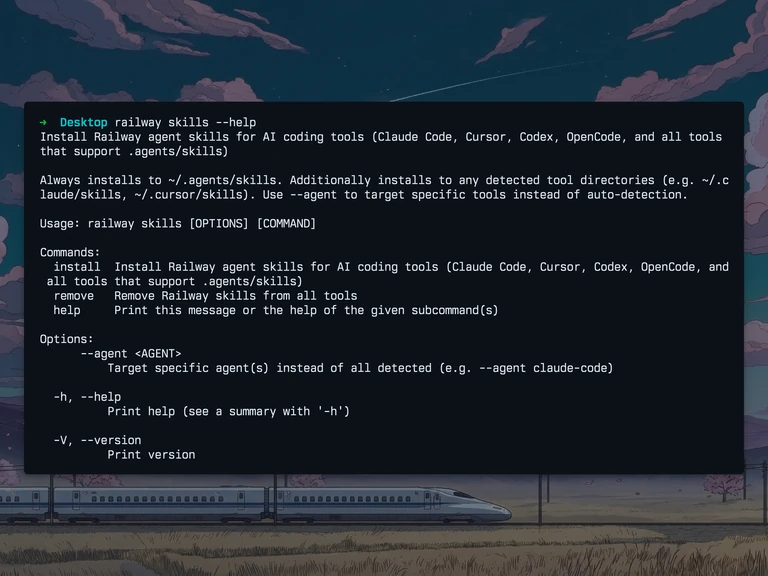
An agent is only as sharp as the instructions it has about the platform it's working with. railway skills install drops Railway's curated agent skills into ~/.agents/skills and any detected tool directories (Claude Code, Cursor, Codex, OpenCode), so your coding agent picks up Railway expertise for deploying, debugging, and managing services.
railway skills installTarget a specific tool with --agent <agent-name> (valid values: universal, claude-code, codex, opencode, cursor), run railway skills update to pick up upstream changes, or railway skills remove to uninstall.
The skills stay in sync with how Railway wants agents to interact with it, so you get the same guidance whether you're in Claude Code, Cursor, Codex, or OpenCode. If you already run a coding agent, this is the fastest way to make it understand Railway without writing a system prompt yourself.
As with the rest of the CLI, the repo is the right place to file issues or send PRs.
Fixes and improvements
- We fixed a bug where deploying a template into an existing project would instead spin up a new project. Templates now land in the project you picked.
- We improved how Railway agent provisions databases. Ask the dashboard agent to add a Postgres, Redis, or any other supported database, and it now sets up the service end-to-end more reliably than before.
- We shipped spec-compliant
llms.txtandllms-full.txtat docs.railway.com/llms.txt and docs.railway.com/llms-full.txt, making it easier for coding agents to index the full Railway documentation. - We improved
railway docs. The command is now interactive and returns the docs URL along with thellms.txtandllms-full.txtURLs, making it easier for coding agents to discover where Railway's docs live. Previously, the command only worked interactively.